11 registered users 7 active trail cameras
Trail camera mounted on a tree in the forest — My Trail Camera Pro online anti-theft protection for trail cameras

Stolen trail camera? Collect evidence about who opened the card.

Catch a Trail Camera Thief

My Trail Camera turns every trail camera SD card into a silent anti-theft trap. Hidden HTML files capture the thief's IP address, GPS location, and browser fingerprint the moment they open the stolen card — you get an instant email alert. PRO adds phone number capture and PDF police reports.

Free forever. No credit card required. Works with any trail camera. · 5 min · full PRO · self-destructs

80+ Camera profiles built-in
8 Trap file templates (2 free, 7 PRO)
0 External accounts needed

How It Works

Three steps. No technical knowledge required.

In short: My Trail Camera generates HTML trap files that you copy to the SD card. When a thief opens the card in a browser, the file silently reports their IP, GPS and browser fingerprint to your account at mytrailcamera.pro and emails you an alert.

1

Download trap files

Generate a ZIP with hidden HTML files from your dashboard. Each file looks like a normal camera export — settings, firmware, photos.

2

Copy to SD card

Put the HTML files on every SD card you use in the field. They sit alongside your real photos. The thief won't know which files are traps.

3

Thief opens a file

When someone opens one of these HTML files on their computer, it silently reports their IP, GPS, browser fingerprint, and OS to your account. You get an instant email with recovery recommendations.

What data is captured?

🌐 IP Address

ISP name, city, region. Traceable by law enforcement.

📍 GPS Location

Browser geolocation with accuracy in meters. Pin on Google Maps.

📱 Phone Number PRO

Fake PIN reset page tricks the thief into entering their number.

💻 Device Fingerprint

OS, browser, screen resolution, timezone, CPU cores, RAM.

Features

Everything you need to manage and protect your trail cameras.

In short: The free version handles trail camera inventory, battery estimation with 80+ built-in profiles, HTML trap file generation, theft detection with IP/GPS/fingerprint capture, email alerts and recovery scoring. PRO adds phone number capture, monitoring zones with interactive maps, weather-aware battery calculations, PDF police reports and cross-camera correlation.

Camera Management

  • 1 trail camera (unlimited with PRO)
  • 80+ built-in camera profiles (battery specs, power type)
  • Battery estimation (days remaining)
  • GPS coordinates with map integration
  • Accessory tracking (SD cards, locks, batteries)
  • Deployment dates, planned check reminders

Anti-Theft Honeypot

  • HTML files that look like real camera exports
  • Instant email alert on detection

Theft Recovery

  • Recovery chance scoring (0-100%)
  • Recommended steps for police
  • Detection dashboard with history
  • Owner test mode (verify your trap works)
  • Auto-mark trail camera as stolen
  • Public profile pages with stolen trail cameras

How to track a stolen trail camera →

PRO

Advanced Protection

  • 7 additional trap templates (fake detection log, decoy map, license & config files...)
  • Phone number capture via fake PIN form
  • ISP geolocation lookup
  • Threat level analysis (behavioral scoring)
  • PDF evidence report for police
  • Cross-camera correlation (serial theft detection)
  • Thief photo capture via the device webcam
PRO

Weather Battery

  • Real weather data (Open-Meteo API)
  • Solar panel charge estimation
  • Temperature factor (Li-ion cold loss)
  • Cloud cover impact on solar
  • Day-by-day simulation with log
  • Snow cover & fog warnings
PRO

Monitoring Zones

  • Group cameras into named zones
  • Interactive Leaflet map with FOV visualization
  • Azimuth, detection range, overlap highlighting
  • Location reviews with A-D scoring
  • Email import (add camera from field)
  • KML export for Google Earth

See It In Action

Real screenshots from the dashboard.

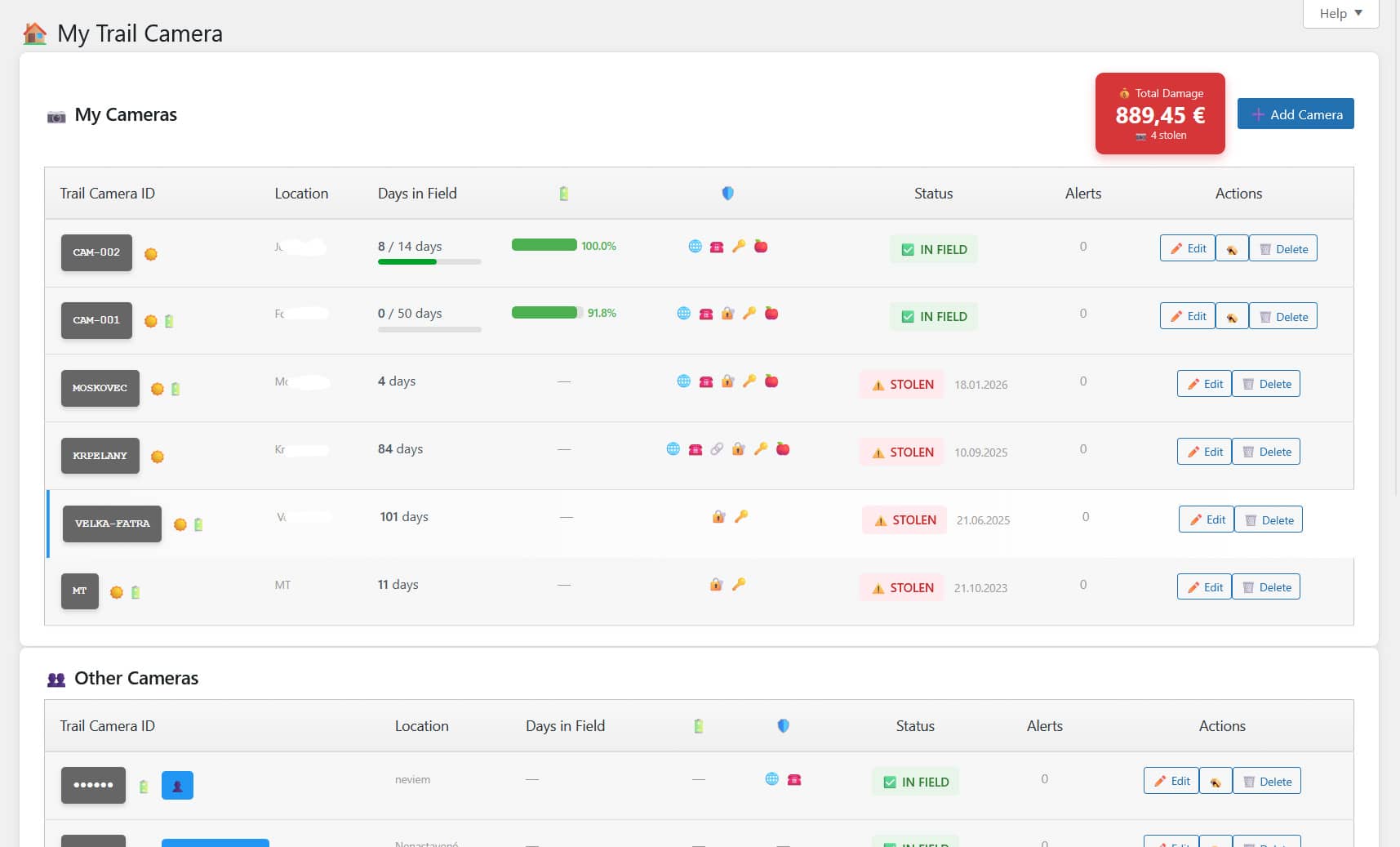
Trail camera dashboard listing all cameras with status, days in field, battery level and total theft damage
Dashboard — manage all your trail cameras with status badges, battery indicators and total theft damage.
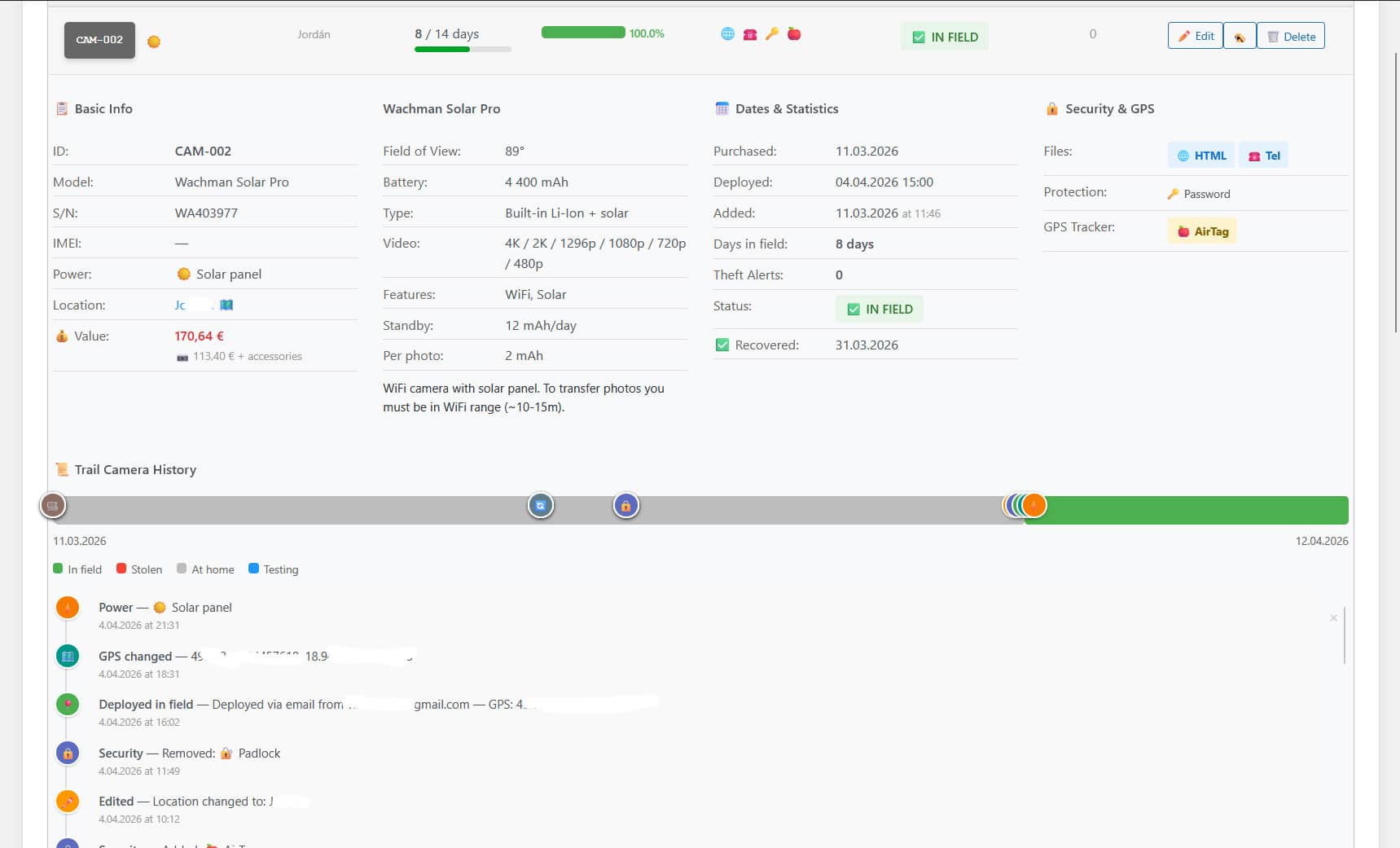
Trail camera detail page showing specifications, GPS, deployment dates and full event timeline
Camera detail — specs, GPS, deployment dates and a complete event timeline (deploy, check, GPS change, stolen).
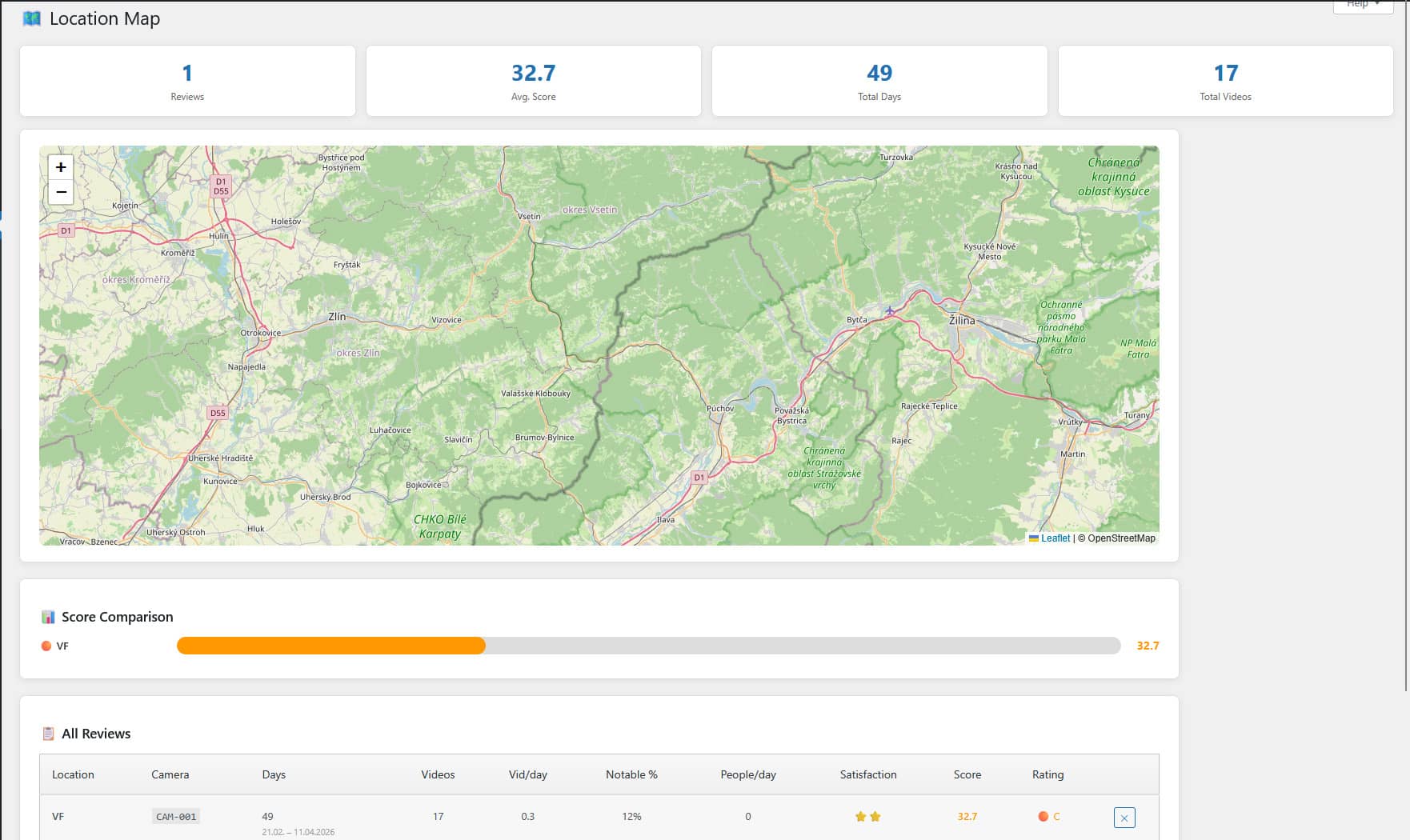
Location map with A-D scoring, score comparison chart and reviews table for all trail camera spots
Locations PRO — rate every monitoring spot with A–D scoring, compare locations on an interactive Leaflet map.
Settings page with tabs for Security, Public profile, Advanced, Custom Models, Integration, Maintenance, Email Import and About
Settings — tabbed interface for security, public profile visibility, data retention, email import and more.

Why Not Just Use a Lock?

Trail camera theft prevention options compared.

Cable Lock Security Box Cellular Camera with GPS My Trail Camera
Prevents theft Partially — bolt cutters Partially — pry bar No No, but raises the chance of catching the thief
Identifies thief No No No Yes — IP, GPS, fingerprint, phone PRO
Works after theft No No Yes (if cellular active) Yes — when thief opens SD files
Recurring cost $0 $0 $5-15/mo SIM $0 (free) or $49/yr (PRO)
One-time cost $15-30 $30-80 $150-400 (camera itself) $0
Works with any camera Most Model-specific No — built-in only Yes — any camera with SD card
Multiple cameras Buy per camera Buy per camera SIM per camera Unlimited — one install

Best strategy: combine a cable lock (physical deterrent) with My Trail Camera (digital evidence collection).

Frequently Asked Questions

Does it really work? Will the thief actually open the files?

Trail camera thieves typically check the SD card contents — they want to see if there are valuable photos or videos. The trap files are HTML pages named to look like normal camera exports (IMAG0001.html, camera-settings.html). When opened in any browser, they silently report back to your site. The thief sees what looks like a normal page. They have no idea they've been fingerprinted.

What if the thief never connects to the internet?

The trap files are HTML pages that run JavaScript. If opened offline (file:// protocol), the request is queued. As soon as the device connects to the internet, the data is sent. GET requests are used specifically for file:// compatibility where POST would fail due to CORS.

Do I need my own hosting or server?

No. Everything runs on our managed platform — sign up at mytrailcamera.pro and the HTML trap files report directly to our servers. No hosting, no installation, no maintenance.

Is GPS always available?

GPS requires the thief's browser to support geolocation and the user to grant permission (or have it auto-granted). Without GPS hardware on the computer, the browser uses IP-based geolocation (accuracy 1-50 km). Even without GPS, you still get the IP address, ISP info, and full device fingerprint.

Can I use this with the police?

Yes. The detection data (IP address, timestamps, GPS coordinates, device fingerprint) is the kind of evidence police can use to identify and locate a suspect. The PRO version generates a formatted PDF evidence report ready to hand to law enforcement.

What cameras are supported?

Any trail camera that uses SD/microSD cards. The HTML files go on the SD card, not on the camera itself. The platform includes 80+ predefined profiles (Browning, Bushnell, Reconyx, Stealth Cam, Spypoint, and more) for battery estimation, but the anti-theft system works with any camera.

Is the free version limited?

The free version is functional but limited to 1 trail camera. You get trail camera management, trap file generation, detection dashboard, email alerts, and recovery scoring. PRO unlocks unlimited trail cameras and adds advanced templates (including phone capture), weather-aware battery estimation, monitoring zones, PDF police reports, and threat analysis.

Is this legal? Am I allowed to collect data on the thief?

In most jurisdictions, collecting evidence about a person who took your property is legal because you are the lawful owner of both the camera and the SD card. The trap files do not hack the thief's device — they just serve a web page that the thief chose to open. The data collected (IP, approximate GPS, browser info) is the same kind of data any website collects from every visitor.

Under EU GDPR, the lawful basis is legitimate interest (Art. 6(1)(f)) — recovering stolen property. The underlying offence is theft and using/holding stolen property, which most criminal codes prohibit explicitly. Laws vary by country; consult local counsel if you plan to bring evidence to court. See our Privacy Policy for details.

Do trap files run any code on the thief's computer?

No. The trap files are plain HTML pages with client-side JavaScript that runs inside the browser sandbox. Nothing is installed, no files are modified, no malware is deployed. The only thing that happens is a standard HTTPS request to mytrailcamera.pro with data the browser already knows about itself (IP, user agent, screen size). This is the same data any website sees when you visit it.

Protect your trail cameras today.

Free forever. No credit card required. Sign up in 30 seconds.